




 Spotlight
YouTube Data Scrapper
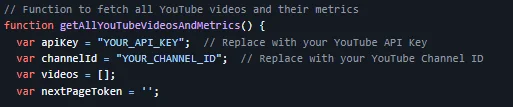
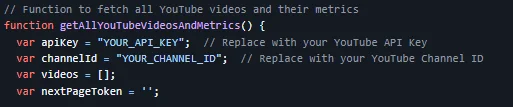
This project is a Google Apps Script that extracts all videos from your YouTube channel and retrieves metrics like views, likes, and average watch time.
Item Description
YouTube Channel Video Data Extractor using Google Apps Script This project is a Google Apps Script that extracts all videos from a YouTube channel and retrieves metrics like views, likes, and average watch time. The script then writes this data into a Google Sheets document for further analysis. Features Fetches all videos from a YouTube channel using pagination. Retrieves video details such as: Title URL Views Likes Estimated average watch time (in seconds).
Requirements A Google account. Access to Google Sheets. A YouTube API key (from the Google Developer Console). Setup Guide Step 1: Get YouTube API Key Go to the Google Developer Console. Create a new project or use an existing one. In the project dashboard, click on Enable APIs and Services. Search for YouTube Data API v3 and enable it. After enabling, go to Credentials and click on Create Credentials.
Choose API Key as the credential type. Copy the generated API key — you'll need it for the script. Step 2: Set up Google Sheets Open a new Google Sheets document. Go to Extensions > Apps Script to open the Google Apps Script editor. Delete any existing code in the script editor. Copy and paste the following code into the Apps Script editor after you add your YouTube API KEy al YouTube ID Channel. execute to obtain the data of your YouTube Channel.
$ 5
- Verified source code
- Join 35542+ buyers which trust us!
- Download code immediately

100% Guarantee For Item!
Satisfaction guarantee policy.
Satisfaction guarantee policy.
Information
| Category | Scripts & Code / JavaScript |
| First Release | 22 October 2024 |
| Frameworks | JavaScript |
Similar Items
Spotlight 




Web Scraper
$60