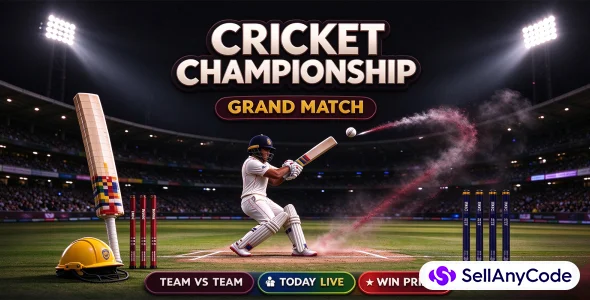


Fantasy Cricket ConFantasy Cricket Contest App Source Codetest App Source Code
Complete fantasy cricket platform: uni-app Vue 3 app + Spring Boot 3 API. Wallet, KYC, live scorecard and auto prize settlement.
Item Description
<h2>Build your own fantasy cricket platform — mobile app and backend included</h2>
<p>This is not a UI template or a half-finished prototype. You get the complete source code for both sides of a working fantasy cricket business:</p>
<ul>
<li><strong>Mobile app</strong> — uni-app, Vue 3, TypeScript, Pinia and Vite. One codebase for Android and iOS (App platform / app-plus).</li>
<li><strong>Backend API</strong> — Spring Boot 3.4.2, Java 17, MyBatis-Plus, MySQL, Redis, Druid, JetCache and WebSocket.</li>
<li><strong>Database</strong> — a 31-table MySQL schema with seed data for the operator account, RBAC menus, roles and contest templates.</li>
<li><strong>Documentation</strong> — step-by-step installation, configuration, build, first-run and user guide.</li>
</ul>
<h3>What you get</h3>
<table border="1" cellpadding="6" cellspacing="0">
<thead>
<tr>
<th align="left">Item</th>
<th align="left">Details</th>
</tr>
</thead>
<tbody>
<tr>
<td>Mobile app source</td>
<td>uni-app (Vue 3 + TypeScript + Pinia + Vite), App platform only</td>
</tr>
<tr>
<td>Backend source</td>
<td>Spring Boot 3.4.2, Java 17, MyBatis-Plus, Maven</td>
</tr>
<tr>
<td>Database</td>
<td>MySQL schema, 31 tables, seed data</td>
</tr>
<tr>
<td>Documentation</td>
<td>Installation, configuration, build, first-run and user guide</td>
</tr>
<tr>
<td>Payments</td>
<td>Mock provider by default; PlusGain integration included; Razorpay adapter is a placeholder</td>
</tr>
<tr>
<td>Live data</td>
<td>EntitySport integration and WebSocket scorecard</td>
</tr>
</tbody>
</table>
<h3>The member experience</h3>
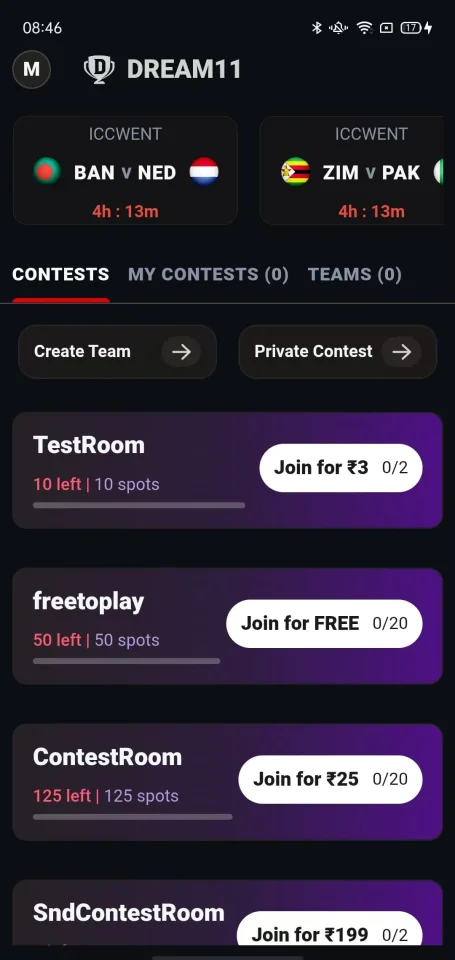
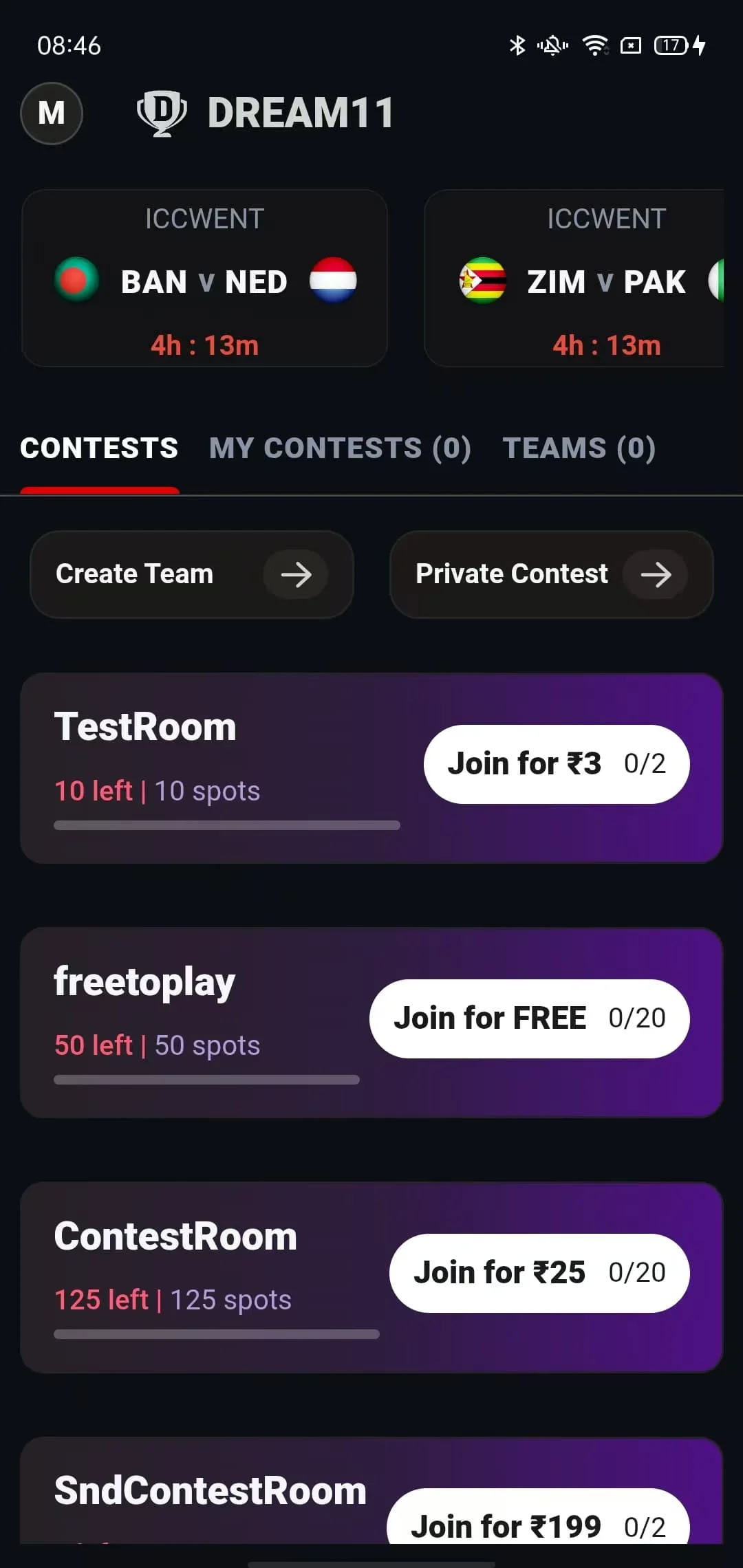
<p>Users sign in with a phone number and a one-time password; unknown numbers are registered automatically. The home screen lists upcoming cricket matches in a horizontal card strip with a countdown and a "Lineups Out" state. Each match opens a tabbed hub:</p>
<ul>
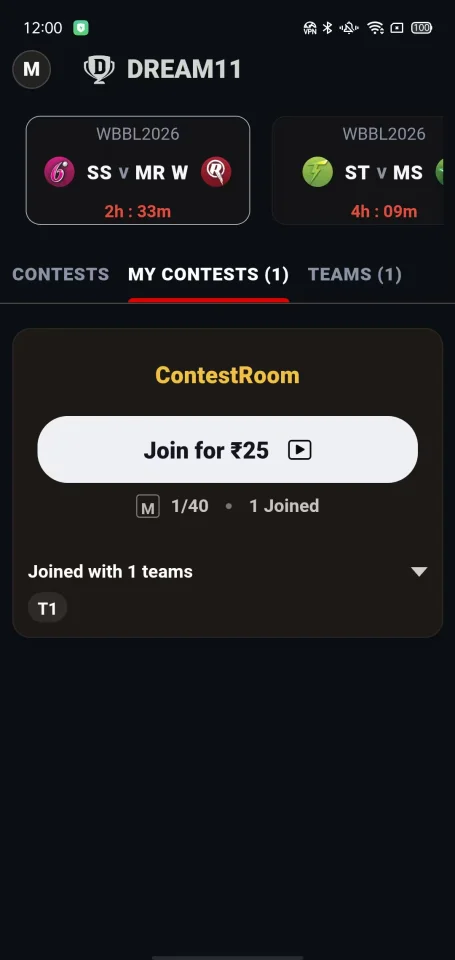
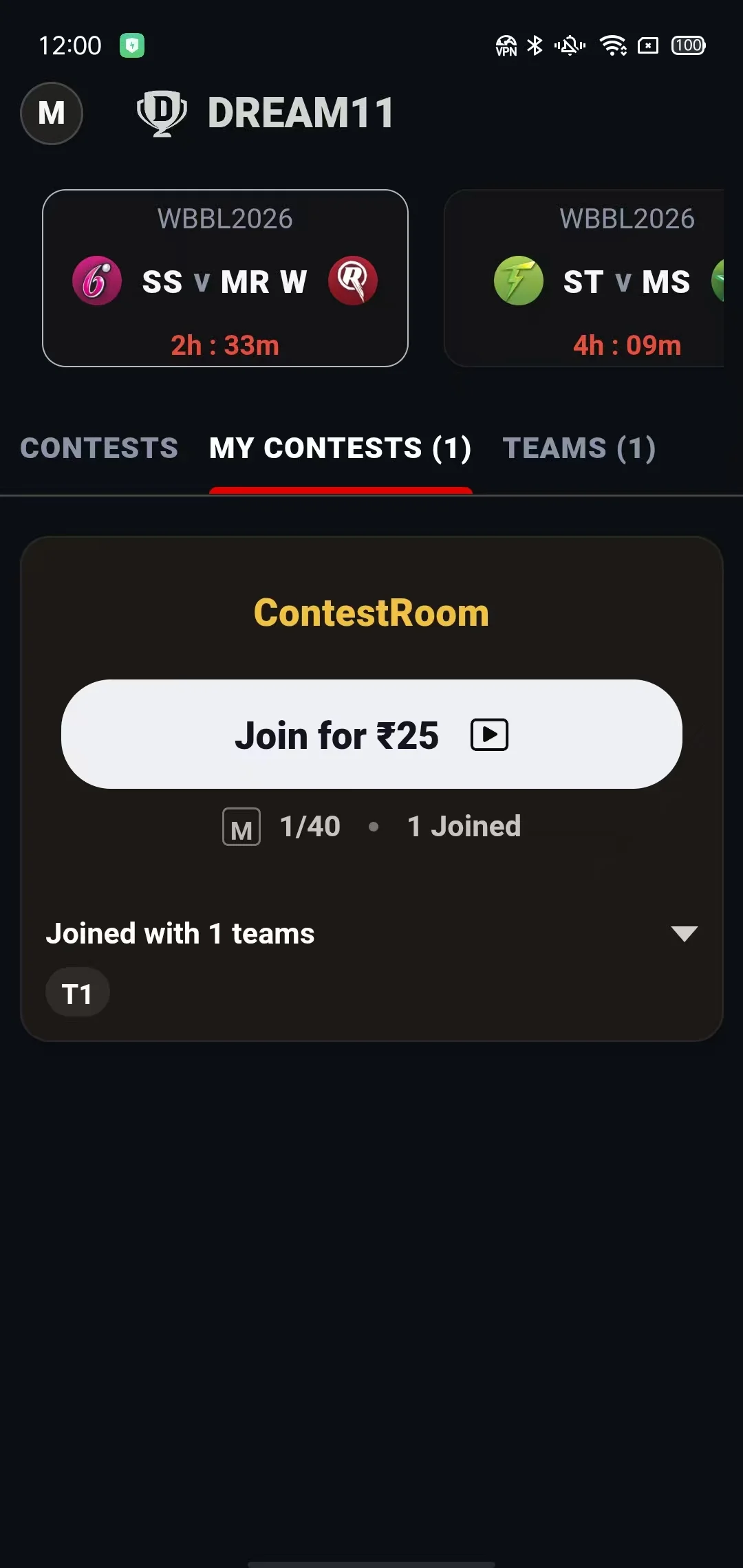
<li><strong>Contests</strong> — Mega and Head-to-Head rooms with entry fee, total spots, spots-left progress, "Join for ₹X" or "Join for FREE", and multi-entry support.</li>
<li><strong>My Contests</strong> — every room the member has joined, grouped by match.</li>
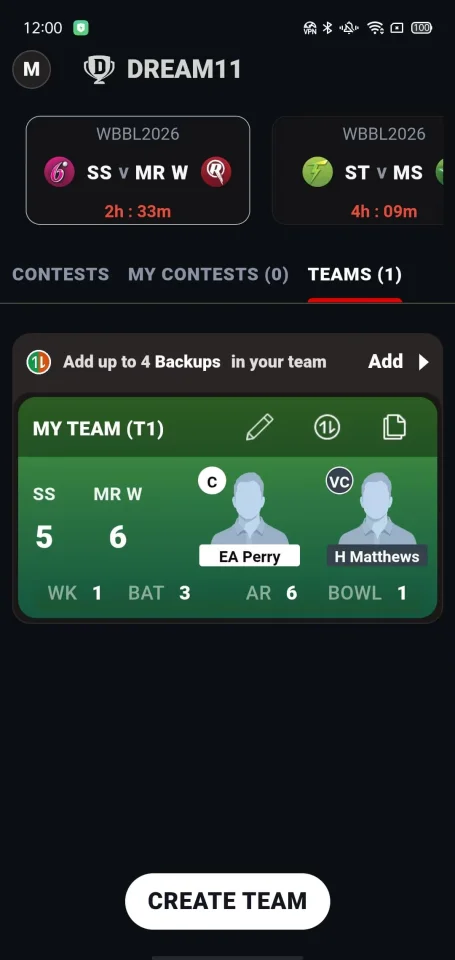
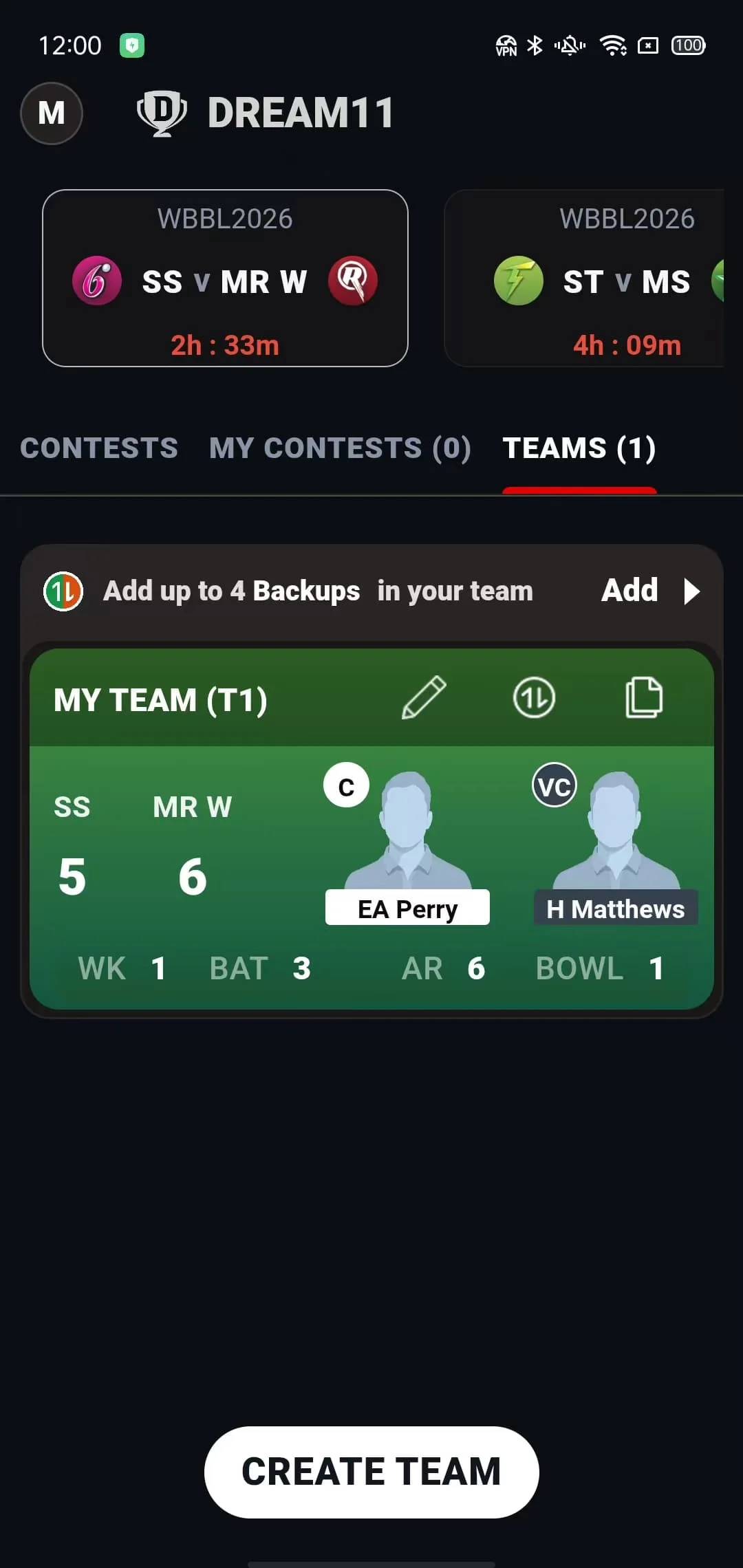
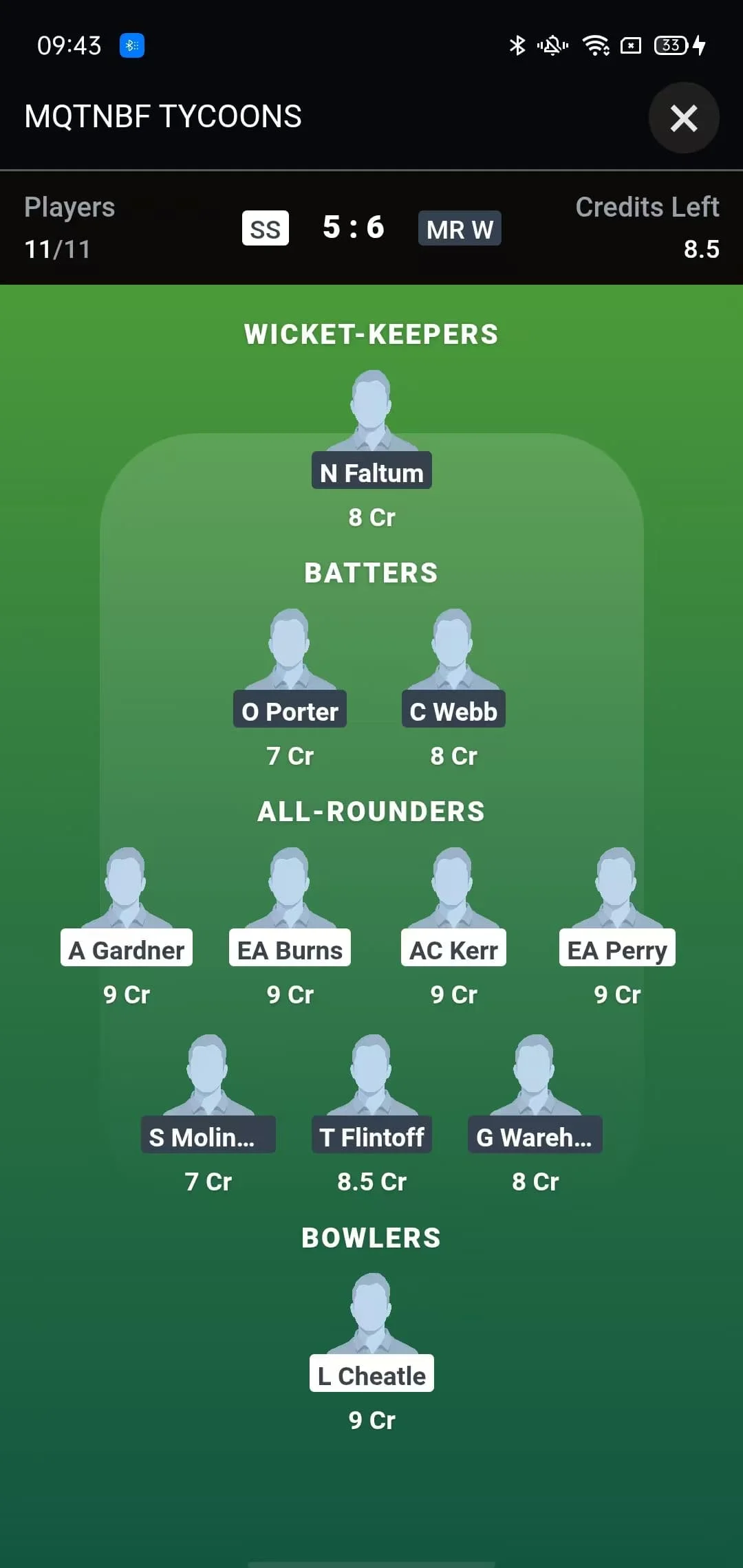
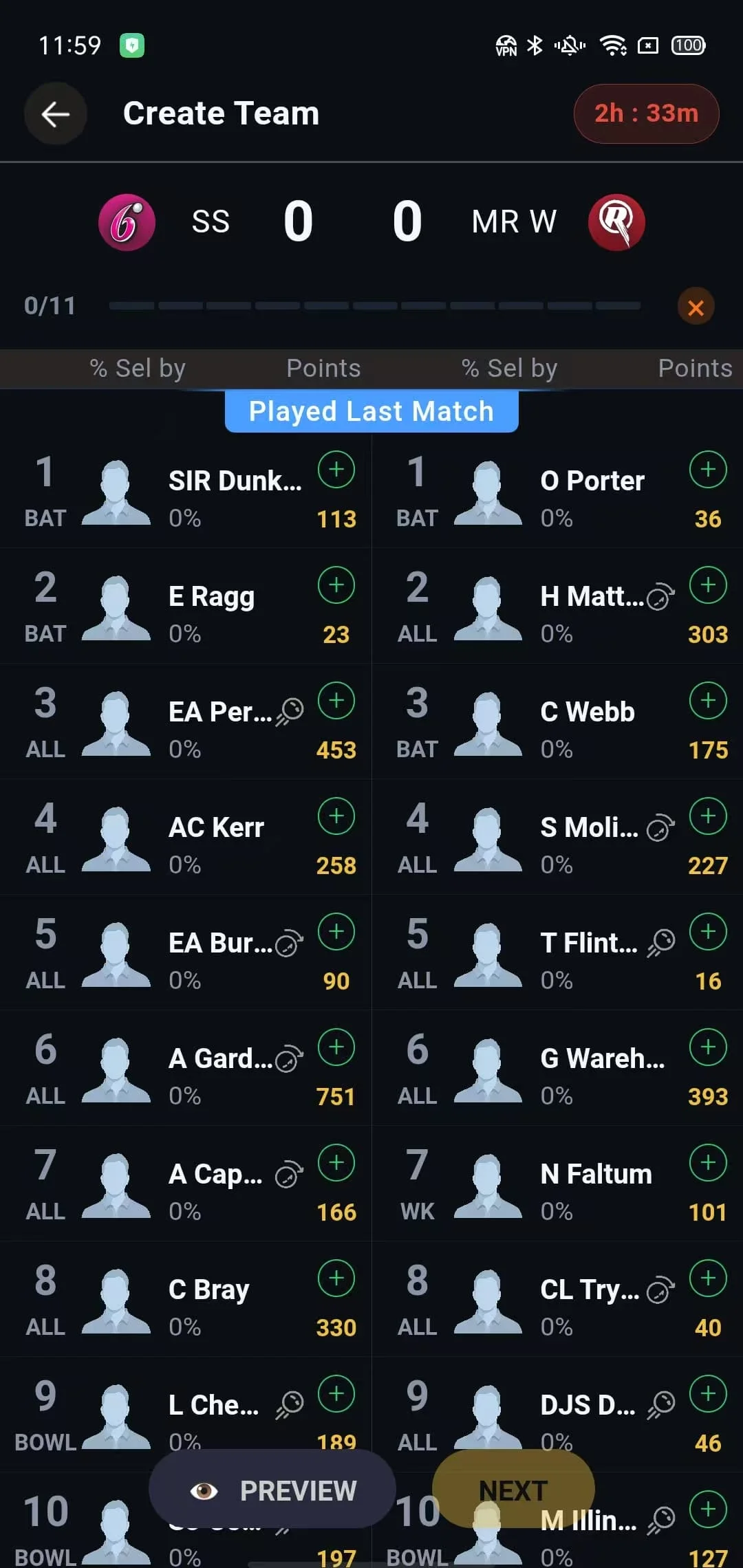
<li><strong>Teams</strong> — saved fantasy lineups with create, edit, preview and player replacement.</li>
<li><strong>Stats / Scorecard</strong> — live player points, batting, bowling, fall of wickets and a real-time scorecard.</li>
<li><strong>Prizes / Leaderboard</strong> — prize ladder and live rankings with the member's own rank highlighted.</li>
</ul>
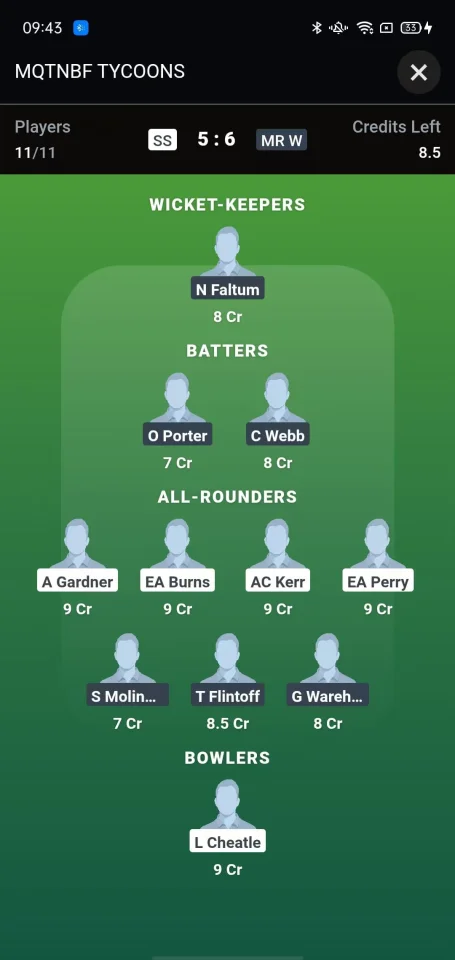
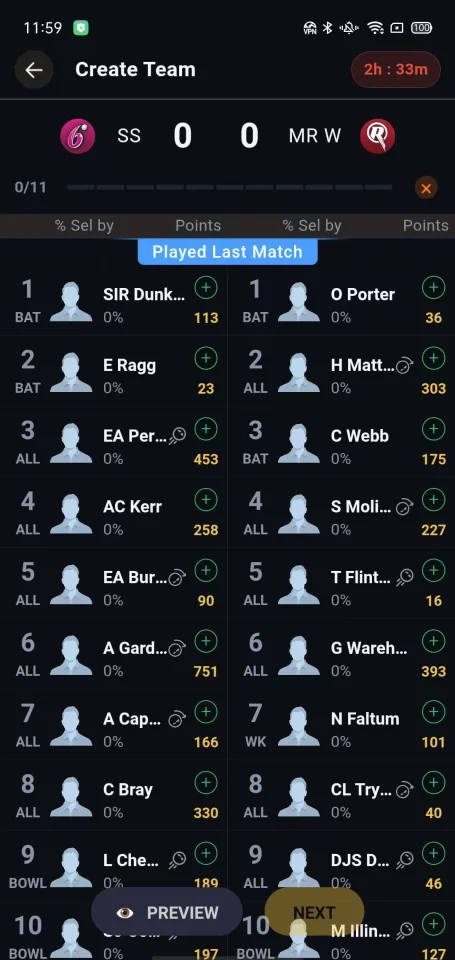
<p>Team creation follows the familiar fantasy cricket rules: 11 players, a 100-credit budget, at least one wicketkeeper / batter / all-rounder / bowler, a maximum of 8 players per role and 10 from a single real team, plus a captain (2× points) and vice-captain (1.5× points).</p>
<h3>The engine under the hood</h3>
<p>The Spring Boot backend is built for match-day automation:</p>
<ul>
<li>Syncs competitions, squads, player points and innings data from EntitySport.</li>
<li>Runs a 30-second match lifecycle job: prepares lineups before the start, locks contests at the first ball, syncs live points, finalises completed matches, handles cancellations and selects the Dream Team.</li>
<li>Creates contest rooms automatically from operator-defined templates.</li>
<li>Settles finished contests by ranking every entry, splitting prizes between tied ranks, writing the prize to the entry and crediting the member's wallet through an idempotent ledger.</li>
<li>Pushes live scorecard updates over WebSocket every 10 seconds.</li>
<li>Stores operator and member sessions in Redis (24 hours / 30 days) and exposes separate operator and member API tracks.</li>
</ul>
<h3>Wallet, payments and compliance</h3>
<ul>
<li>Three-part wallet: deposit, bonus and winnings, with an append-only transaction ledger.</li>
<li>Entry fees are debited atomically with spot reservation (no overselling); prizes are credited as winnings.</li>
<li>Recharge, withdrawal, transaction history and prize summary screens are included.</li>
<li>PlusGain payment and payout endpoints are included (merchant credentials required). The shipped app calls the mock provider by default for testing.</li>
<li>KYC covers PAN card, bank account, IFSC lookup and proof upload.</li>
</ul>
<h3>Operator API</h3>
<p>A complete operator/back-office API is included: accounts, roles, menus and permissions (RBAC), departments, dictionaries, matches, squads, innings, player points, contests, contest templates, match-to-contest mapping, match monitoring, members, wallets, KYC, payments and file uploads.</p>
<p>The package does not include a web admin UI — connect it to your own dashboard, Postman, or any HTTP client.</p>
<h3>Good to know</h3>
<ul>
<li><strong>No admin web UI.</strong> The backend exposes operator APIs; the mobile app is the member client. You can build your own admin dashboard on top of the API.</li>
<li><strong>App platform only.</strong> The front end targets uni-app App (Android/iOS). It does not include H5 or WeChat Mini Program builds.</li>
<li><strong>Third-party accounts are required for live features.</strong> EntitySport (match data), an ihuyi-compatible SMS gateway and SMTP are needed for live data, OTP login and email codes. Payment and payout features need PlusGain merchant credentials (or your own gateway integration).</li>
<li><strong>Default payment mode is mock.</strong> The shipped app's Add Cash flow calls the mock provider. PlusGain payment and payout endpoints are included for real transactions, but they require merchant credentials and app wiring. The Razorpay adapter is a stub, not a working integration.</li>
<li><strong>Rebrand before publishing.</strong> The app ships with the "DREAM11" demo branding. Change the app name, package name, icons, splash screen and theme text before publishing.</li>
<li><strong>Trademark notice.</strong> Dream11 is a trademark of its respective owner. This product is an independent fantasy cricket platform and is not affiliated with, endorsed by, or sponsored by Dream11.</li>
</ul>
<h3>Ideal for</h3>
<p>Fantasy sports startups, cricket fan communities, agencies building white-label sports apps, and developers who want a working fantasy cricket foundation instead of starting from zero.</p>
Features
- <!DOCTYPE html>
- <html lang="en">
- <head>
- <meta charset="utf-8">
- <meta name="viewport" content="width=device-width, initial-scale=1">
- <title>Fantasy Cricket Contest Platform — Installation & User Guide</title>
- <meta name="description" content="Installation, configuration, build, first-run, user and operator guide for the Fantasy Cricket Contest Platform.">
- <style>
- :root {
- --ink: #1f2430;
- --muted: #5b6472;
- --line: #e5e7eb;
- --brand: #0b0e13;
- --gold: #c9a227;
- --code-bg: #0f172a;
- --code-ink: #e5e7eb;
- }
- { box-sizing: border-box; }
- html { scroll-behavior: smooth; }
- body {
- margin: 0;
- background: #fff;
- color: var(--ink);
- font-family: -apple-system, BlinkMacSystemFont, "Segoe UI", Roboto, Helvetica, Arial, sans-serif;
- font-size: 16px;
- line-height: 1.68;
- }
- main.doc {
- max-width: 920px;
- margin: 0 auto;
- padding: 48px 28px 80px;
- }
- h1, h2, h3, h4 { color: var(--brand); line-height: 1.25; }
- h1 {
- font-size: 2.15em;
- margin: 0 0 .6em;
- padding-bottom: .35em;
- border-bottom: 3px solid var(--gold);
- }
- h2 {
- font-size: 1.5em;
- margin: 2.2em 0 .6em;
- padding-bottom: .3em;
- border-bottom: 1px solid var(--line);
- scroll-margin-top: 24px;
- }
- h3 { font-size: 1.16em; margin: 1.8em 0 .5em; scroll-margin-top: 24px; }
- p { margin: .75em 0; }
- a { color: #0f5bd7; text-decoration: none; }
- a:hover { text-decoration: underline; }
- strong { color: #111827; }
- hr { border: 0; border-top: 1px solid var(--line); margin: 2em 0; }
- ul, ol { padding-left: 1.6em; }
- li { margin: .28em 0; }
- li > ul, li > ol { margin-top: .3em; }
- code {
- font-family: ui-monospace, SFMono-Regular, Menlo, Consolas, "Liberation Mono", monospace;
- font-size: .88em;
- background: #f1f5f9;
- border: 1px solid #e2e8f0;
- border-radius: 4px;
- padding: .12em .35em;
- }
- pre {
- background: var(--code-bg);
- color: var(--code-ink);
- padding: 18px 20px;
- border-radius: 10px;
- overflow-x: auto;
- line-height: 1.55;
- font-size: .88em;
- margin: 1.1em 0;
- }
- pre code {
- background: transparent;
- border: 0;
- padding: 0;
- color: inherit;
- font-size: 1em;
- }
- blockquote {
- margin: 1.2em 0;
- padding: .7em 1em;
- border-left: 4px solid var(--gold);
- background: #fffbeb;
- color: #4b5563;
- }
- blockquote p { margin: .35em 0; }
- table {
- width: 100%;
- border-collapse: collapse;
- margin: 1.2em 0;
- font-size: .93em;
- }
- th, td {
- border: 1px solid #d8dee7;
- padding: 9px 11px;
- text-align: left;
- vertical-align: top;
- }
- th { background: #f3f4f6; font-weight: 600; color: #111827; }
- tbody tr:nth-child(even) { background: #fafbfc; }
- @media (max-width: 640px) {
- main.doc { padding: 28px 18px 60px; }
- h1 { font-size: 1.75em; }
- h2 { font-size: 1.3em; }
- table { font-size: .86em; }
- }
- @media print {
- body { font-size: 12px; }
- main.doc { max-width: none; padding: 0; }
- a { color: inherit; text-decoration: none; }
- pre { white-space: pre-wrap; word-break: break-word; }
- h1, h2, h3 { page-break-after: avoid; }
- pre, table, blockquote { page-break-inside: avoid; }
- }
- </style>
- </head>
- <body>
- <main class="doc">
- <h1>Fantasy Cricket Contest Platform — Installation & User Guide</h1>
- <p><strong>Package version:</strong> Mobile app 0.1.0 · Backend 0.0.1
- <strong>Last updated:</strong> 2026-11-14</p>
- <hr>
- <h2 id="contents">Contents</h2>
- <ol>
- <li><a href="#1-overview">Overview</a></li>
- <li><a href="#2-package-contents">Package contents</a></li>
- <li><a href="#3-architecture">Architecture</a></li>
- <li><a href="#4-requirements">Requirements</a></li>
- <li><a href="#5-backend-installation">Backend installation</a></li>
- <li><a href="#6-mobile-app-installation">Mobile app installation</a></li>
- <li><a href="#7-first-run-checklist">First-run checklist</a></li>
- <li><a href="#8-member-user-guide">Member user guide</a></li>
- <li><a href="#9-operator-guide">Operator guide</a></li>
- <li><a href="#10-api-overview">API overview</a></li>
- <li><a href="#11-authentication">Authentication</a></li>
- <li><a href="#12-websocket">WebSocket</a></li>
- <li><a href="#13-scheduled-jobs">Scheduled jobs</a></li>
- <li><a href="#14-third-party-integrations">Third-party integrations</a></li>
- <li><a href="#15-payment-configuration">Payment configuration</a></li>
- <li><a href="#16-rebranding">Rebranding</a></li>
- <li><a href="#17-troubleshooting">Troubleshooting</a></li>
- <li><a href="#18-production-hardening-checklist">Production hardening checklist</a></li>
- <li><a href="#19-known-limitations">Known limitations</a></li>
- <li><a href="#20-compliance-and-trademark-notice">Compliance and trademark notice</a></li>
- </ol>
- <hr>
<h2 id="1-overview">1. Overview</h2>
- <p>This package contains a complete fantasy cricket contest platform:</p>
- <ul>
- <li>A <strong>mobile app</strong> built with uni-app (Vue 3 + TypeScript + Pinia + Vite), targeting Android and iOS through the uni-app App platform (<code>app-plus</code>).</li>
- <li>A <strong>Spring Boot 3 backend</strong> (Java 17) with MySQL, Redis, live match synchronisation, a wallet ledger, KYC, payments and a live scorecard WebSocket.</li>
- </ul>
<p>Members log in with a phone number and OTP, build a fantasy team under a credit budget, join free or paid contests, follow live scores and leaderboards, and withdraw winnings to a verified bank account. Operators drive the platform through the backend's operator API: matches and squads are synchronised from EntitySport, contest rooms are generated from templates, and finished matches are settled automatically.</p>
<p>The package is intended for developers and businesses that want a working fantasy cricket foundation and are prepared to configure their own third-party accounts (cricket data, SMS, email, payments) and rebrand the app.</p>
<hr>
<h2 id="2-package-contents">2. Package contents</h2>
- <pre><code>fantasy-cricket-platform/
- ├── DreamApp/ # Mobile app (uni-app / Vue 3 / TypeScript)
- │ ├── src/
- │ │ ├── api/ # API clients (auth, match, contest, wallet, KYC, team)
- │ │ ├── components/ # Shared UI (DreamMain, drawer, notice bar, loading)
- │ │ ├── config/ # Environment configuration
- │ │ ├── pages/ # App screens
- │ │ ├── router/ # Page navigation helpers
- │ │ ├── static/ # Images, icons, illustrations
- │ │ ├── store/ # Pinia stores (user, wallet, KYC)
- │ │ ├── styles/ # Shared styles
- │ │ ├── utils/ # Time, formatting, WebSocket, notices
- │ │ ├── manifest.json # App identity, permissions, icons
- │ │ └── pages.json # Page registry and navigation style
- │ ├── .env # API and WebSocket base URLs
- │ ├── package.json
- │ └── vite.config.ts
- │
- └── zx_spring_dream/ # Backend (Spring Boot 3 / Java 17)
- ├── db/
- │ └── Datasource.sql # MySQL schema + seed data (31 tables)
- ├── src/main/java/com/zx/
- │ ├── controller/ # Admin, web and mobile endpoints
- │ ├── module/ # Business modules (competition, contest, member, wallet, user, system, plusgain)
- │ ├── frame/ # Interceptors, base classes, config, constants
- │ ├── websocket/ # Live scorecard WebSocket handler
- │ └── utils/ # Redis, SMS, QR, Excel, IFSC and scheduled tasks
- ├── src/main/resources/
- │ └── application.properties # Server, database, Redis, integrations
- ├── pom.xml
- └── README.md # Backend-focused technical notes
- </code></pre>
- <blockquote>
- <p>The backend contains no web admin UI, no H5 build and no WeChat Mini Program build.</p>
- </blockquote>
- <hr>
<h2 id="3-architecture">3. Architecture</h2>
- <pre><code>┌──────────────────────────────────────────────┐
- │ Mobile app (Android / iOS) │
- │ uni-app · Vue 3 · TypeScript · Pinia │
- └───────────────┬──────────────────────────────┘
- │ HTTPS REST (JSON)
- │ WebSocket (live scorecard)
- ▼
- ┌──────────────────────────────────────────────┐
- │ Spring Boot 3 API │
- │ context path: /dream-server │
- │ port: 8080 │
- ├──────────────────────────────────────────────┤
- │ MySQL 8 Redis 6+ │
- │ (31 tables) (sessions, OTP, cache) │
- ├──────────────────────────────────────────────┤
- │ EntitySport · SMS gateway · SMTP │
- │ PlusGain · IFSC lookup │
- └──────────────────────────────────────────────┘
- </code></pre>
- <hr>
<h2 id="4-requirements">4. Requirements</h2>
- <h3 id="41-server">4.1 Server</h3>
- <table>
- <thead>
- <tr>
- <th>Item</th>
- <th>Requirement</th>
- </tr>
- </thead>
- <tbody><tr>
- <td>Java</td>
- <td>JDK 17</td>
- </tr>
- <tr>
- <td>Build</td>
- <td>Maven 3.6+ (no <code>mvnw</code> wrapper included)</td>
- </tr>
- <tr>
- <td>Database</td>
- <td>MySQL 8.0+</td>
- </tr>
- <tr>
- <td>Cache / session store</td>
- <td>Redis 6+</td>
- </tr>
- <tr>
- <td>Memory</td>
- <td>2 GB minimum, 4 GB recommended</td>
- </tr>
- <tr>
- <td>Disk</td>
- <td>Writable directory for uploads</td>
- </tr>
- <tr>
- <td>OS</td>
- <td>Linux or Windows</td>
- </tr>
- <tr>
- <td>Network</td>
- <td>Outbound internet for EntitySport, SMS, SMTP and IFSC</td>
- </tr>
- </tbody></table>
- <h3 id="42-mobile-build-environment">4.2 Mobile build environment</h3>
- <table>
- <thead>
- <tr>
- <th>Item</th>
- <th>Requirement</th>
- </tr>
- </thead>
- <tbody><tr>
- <td>Node.js</td>
- <td>18+ (20 LTS recommended)</td>
- </tr>
- <tr>
- <td>Package manager</td>
- <td>npm 9+ or pnpm 8+</td>
- </tr>
- <tr>
- <td>IDE</td>
- <td>HBuilderX 4.x (recommended for device preview and cloud packaging)</td>
- </tr>
- <tr>
- <td>DCloud account</td>
- <td>Required for App cloud build</td>
- </tr>
- <tr>
- <td>Android</td>
- <td>minSdk 21 (Android 5.0+), targetSdk 30 in the shipped manifest</td>
- </tr>
- <tr>
- <td>iOS</td>
- <td>iOS 12+ (set the deployment target in HBuilderX / Xcode)</td>
- </tr>
- <tr>
- <td>Signing</td>
- <td>Android keystore, Apple certificates and provisioning profiles for store releases</td>
- </tr>
- </tbody></table>
- <blockquote>
<p>The <code>@dcloudio/*</code> packages are pinned to <code>3.0.0-5020620260917001</code>. Use a HBuilderX version whose bundled uni-app compiler is compatible with this version, or upgrade all <code>@dcloudio</code> packages together.</p>
- </blockquote>
- <h3 id="43-third-party-accounts">4.3 Third-party accounts</h3>
- <table>
- <thead>
- <tr>
- <th>Service</th>
- <th>Required for</th>
- <th>Notes</th>
- </tr>
- </thead>
- <tbody><tr>
- <td>EntitySport</td>
- <td>Live matches, squads, player points, scorecards</td>
- <td>Paid API token</td>
- </tr>
- <tr>
- <td>SMS gateway</td>
- <td>OTP login and registration</td>
- <td>ihuyi-compatible HTTP API</td>
- </tr>
- <tr>
- <td>SMTP mailbox</td>
- <td>Email verification codes</td>
- <td>Any SMTP provider</td>
- </tr>
- <tr>
- <td>PlusGain</td>
- <td>Real recharges and payouts</td>
- <td>Merchant number, app ID, keys</td>
- </tr>
- <tr>
- <td>Google Play / Apple</td>
- <td>Publishing the app</td>
- <td>Developer accounts</td>
- </tr>
- </tbody></table>
- <hr>
<h2 id="5-backend-installation">5. Backend installation</h2>
<h3 id="51-create-the-database">5.1 Create the database</h3>
<p>The SQL script does <strong>not</strong> contain <code>CREATE DATABASE</code> or <code>USE</code>. Create the schema first:</p>
- <pre><code class="language-sql">CREATE DATABASE dream
- CHARACTER SET utf8mb4
- COLLATE utf8mb4_unicode_ci;
- </code></pre>
- <h3 id="52-import-the-schema">5.2 Import the schema</h3>
- <pre><code class="language-bash">mysql -u root -p dream < db/Datasource.sql
- </code></pre>
<p><strong>Warning:</strong> <code>db/Datasource.sql</code> starts with <code>DROP TABLE IF EXISTS</code> statements for all 31 tables. Do not run it against a database that contains data you need.</p>
- <p>The script includes seed data for:</p>
- <ul>
- <li><code>system_account</code> — one operator account plus test accounts with placeholder phone numbers</li>
- <li><code>system_role</code>, <code>system_menu</code>, <code>system_account_role</code>, <code>system_role_menu</code> — RBAC scaffolding</li>
- <li><code>system_dictionary</code>, <code>system_dictionary_item</code> — dictionaries</li>
- <li><code>t_contest_template</code> — contest templates (some still carry test names)</li>
- </ul>
- <p>Clean the test accounts and test templates before going live.</p>
- <h3 id="53-configure-applicationproperties">5.3 Configure <code>application.properties</code></h3>
- <p>The main configuration file is <code>src/main/resources/application.properties</code>.</p>
- <h4>Server</h4>
- <table>
- <thead>
- <tr>
- <th>Key</th>
- <th>Default</th>
- <th>Action</th>
- </tr>
- </thead>
- <tbody><tr>
- <td><code>server.port</code></td>
- <td><code>8080</code></td>
- <td>Change if needed</td>
- </tr>
- <tr>
- <td><code>server.servlet.context-path</code></td>
- <td><code>/dream-server</code></td>
- <td>Keep or change consistently in the app <code>.env</code></td>
- </tr>
- <tr>
- <td><code>server.host</code></td>
- http://127.0.0.1:9000
- Must change to your public base URL (for example https://api.example.com)
- </tr>
- <tr>
- <td><code>spring.application.name</code></td>
- <td><code>dream</code></td>
- <td>Optional rebrand</td>
- </tr>
- </tbody></table>
- <h4>Database</h4>
- <table>
- <thead>
- <tr>
- <th>Key</th>
- <th>Default</th>
- <th>Action</th>
- </tr>
- </thead>
- <tbody><tr>
- <td><code>spring.datasource.url</code></td>
- <td><code>jdbc:mysql://127.0.0.1:3306/dream?...</code></td>
- <td>Point to your MySQL instance</td>
- </tr>
- <tr>
- <td><code>spring.datasource.username</code></td>
- <td><code>root</code></td>
- <td>Change</td>
- </tr>
- <tr>
- <td><code>spring.datasource.password</code></td>
- <td><code>123456</code></td>
- <td>Change</td>
- </tr>
- <tr>
- <td><code>spring.datasource.druid.*</code></td>
- <td>Pool size 10 / 10 / 20</td>
- <td>Tune for your load</td>
- </tr>
- </tbody></table>
- <h4>Redis</h4>
- <table>
- <thead>
- <tr>
- <th>Key</th>
- <th>Default</th>
- <th>Action</th>
- </tr>
- </thead>
- <tbody><tr>
- <td><code>spring.data.redis.host</code></td>
- <td><code>localhost</code></td>
- <td>Change</td>
- </tr>
- <tr>
- <td><code>spring.data.redis.port</code></td>
- <td><code>6379</code></td>
- <td>Change</td>
- </tr>
- <tr>
- <td><code>spring.data.redis.password</code></td>
- <td><em>(empty)</em></td>
- <td>Set if your Redis requires auth</td>
- </tr>
- <tr>
- <td><code>jetcache.remote.default.uri</code></td>
- <td><code>redis://localhost:6379/</code></td>
- <td>Update together with Redis host/port/password</td>
- </tr>
- </tbody></table>
<p>Redis is used for operator sessions (24 hours), member sessions (30 days, sliding), SMS and email codes (5 minutes), and JetCache entries. Login and verification-code flows do not work without Redis.</p>
- <h4>Files and uploads</h4>
- <table>
- <thead>
- <tr>
- <th>Key</th>
- <th>Default</th>
- <th>Action</th>
- </tr>
- </thead>
- <tbody><tr>
- <td><code>resource.url</code></td>
- <td><code>D:/Work/resources/dream/</code></td>
- <td><strong>Must change</strong> to a writable directory on your server</td>
- </tr>
- <tr>
- <td><code>img.url</code></td>
- <td><code>${server.host}${server.servlet.context-path}/file/img?id=</code></td>
- <td>Derived from <code>server.host</code></td>
- </tr>
- <tr>
- <td><code>spring.servlet.multipart.max-file-size</code></td>
- <td><code>20MB</code></td>
- <td>Adjust if needed</td>
- </tr>
- </tbody></table>
- <h3 id="54-start-redis">5.4 Start Redis</h3>
- <pre><code class="language-bash">redis-server
- </code></pre>
- <p>Verify:</p>
- <pre><code class="language-bash">redis-cli ping
- # PONG
- </code></pre>
- <h3 id="55-build-and-run">5.5 Build and run</h3>
- <p>Development:</p>
- <pre><code class="language-bash">mvn spring-boot:run
- </code></pre>
- <p>Package and run:</p>
- <pre><code class="language-bash">mvn clean package -DskipTests
- java -jar target/dream-0.0.1.jar
- </code></pre>
- <p>The API is served at:</p>
- <pre><code>http://localhost:8080/dream-server
- </code></pre>
- <h3 id="56-verify-the-backend">5.6 Verify the backend</h3>
- <pre><code class="language-bash">curl http://localhost:8080/dream-server/mobile/meta/serverTime
- </code></pre>
<p>A successful JSON response means the application is up. If the response is an authentication error, check the public path list in the README and confirm the context path.</p>
- <h3 id="57-default-operator-account">5.7 Default operator account</h3>
- <p>Seed data creates:</p>
- <pre><code>username: admin
- password: 123456
- </code></pre>
<p>The password is stored as an MD5 hash (<code>e10adc3949ba59abbe56e057f20f883e</code>). Change it immediately after the first login, and delete the unused test accounts.</p>
<hr>
<h2 id="6-mobile-app-installation">6. Mobile app installation</h2>
- <h3 id="61-install-dependencies">6.1 Install dependencies</h3>
- <pre><code class="language-bash">cd DreamApp
- npm install
- # or
- pnpm install
- </code></pre>
- <h3 id="62-configure-api-endpoints">6.2 Configure API endpoints</h3>
- <p>Edit <code>.env</code> in the project root:</p>
VITE_API_BASE_URL=https://api.example.com/dream-...
- VITE_WS_BASE_URL=wss://api.example.com/dream-server
- </code></pre>
- <p>Rules:</p>
- <ul>
- <li>Use <strong>absolute URLs</strong>; the app runs in a native WebView and does not use the Vite dev proxy.</li>
- <li>Do not add a trailing slash.</li>
- <li>Use <code>https://</code> and <code>wss://</code> for production.</li>
When testing on a physical device or emulator, localhost points to the device itself. Use the host machine's LAN IP (for example http://192.168.1.20:8080/dream-server).
- <li>If <code>VITE_WS_BASE_URL</code> is omitted, the app derives the WebSocket URL from <code>VITE_API_BASE_URL</code>.</li>
- </ul>
- <h3 id="63-run-in-development">6.3 Run in development</h3>
- <pre><code class="language-bash">npm run dev:app
- </code></pre>
<p>This runs <code>uni -p app</code> and produces a development bundle. To preview on a phone or emulator, open the project in HBuilderX and use <strong>Run → Run to Phone or Emulator</strong> with a custom debug base or standard base.</p>
- <h3 id="64-configure-the-app-identity">6.4 Configure the app identity</h3>
- <p>Edit <code>src/manifest.json</code>:</p>
- <table>
- <thead>
- <tr>
- <th>Field</th>
- <th>Shipped value</th>
- <th>Change to</th>
- </tr>
- </thead>
- <tbody><tr>
- <td><code>name</code></td>
- <td><code>Dream11</code></td>
- <td>Your app name</td>
- </tr>
- <tr>
- <td><code>appid</code></td>
- <td><em>(empty)</em></td>
- <td>Your DCloud App ID</td>
- </tr>
- <tr>
- <td><code>description</code></td>
- <td><code>Dream11</code></td>
- <td>Your description</td>
- </tr>
- <tr>
- <td><code>versionName</code></td>
- <td><code>0.1.0</code></td>
- <td>Your version</td>
- </tr>
- <tr>
- <td><code>versionCode</code></td>
- <td><code>100</code></td>
- <td>Increment for each release</td>
- </tr>
- <tr>
- <td>Android <code>packagename</code></td>
- <td><code>com.dream11.app</code></td>
- <td>Your own package name</td>
- </tr>
- <tr>
- <td>Android permissions</td>
- <td>Internet, network state, camera, storage</td>
- <td>Keep only what you need</td>
- </tr>
- <tr>
- <td>Icons</td>
- <td><code>unpackage/res/icons/*</code></td>
- <td>Your icons</td>
- </tr>
- <tr>
- <td>Splash screen</td>
- <td>HBuilderX settings</td>
- <td>Your splash</td>
- </tr>
- </tbody></table>
- <h3 id="65-build-a-release">6.5 Build a release</h3>
- <p>CLI build:</p>
- <pre><code class="language-bash">npm run build:app
- </code></pre>
- <p>Store-ready packaging:</p>
- <ol>
- <li>Open the project in HBuilderX.</li>
- <li>Select <strong>Release → Native App Cloud Packaging</strong>.</li>
- <li>Choose Android and/or iOS.</li>
- <li>Provide the Android keystore or the iOS certificate and provisioning profile.</li>
- <li>Build, download the APK/AAB or IPA, and upload it to the store.</li>
- </ol>
- <h3 id="66-rebranding-checklist-mobile">6.6 Rebranding checklist (mobile)</h3>
- <ul>
- <li><code>src/manifest.json</code> — app name, App ID, package name, version, icons, splash.</li>
- <li><code>src/pages/login/index.vue</code> — login screen brand text.</li>
- <li><code>src/pages/home/index.vue</code> — home screen brand text and trophy image.</li>
- <li><code>src/components/AppDrawer.vue</code> — drawer brand and menu text.</li>
- <li><code>src/static/</code> — logo, trophy, icons, illustrations, ad and notice images.</li>
- <li>Theme colors — the dark navy (<code>#0B0E13</code>) and gold accent are repeated across pages and <code>src/styles/</code>.</li>
- <li>Legal pages — point the webview to your own terms, privacy policy and responsible-play pages.</li>
- <li>Store metadata — screenshots, description, privacy declarations and content ratings.</li>
- </ul>
- <hr>
<h2 id="7-first-run-checklist">7. First-run checklist</h2>
- <p>Complete these steps in order:</p>
- <ol>
- <li><strong>Database</strong> — create <code>dream</code>, import <code>db/Datasource.sql</code>, and confirm 31 tables exist.</li>
- <li><strong>Backend configuration</strong> — set MySQL, Redis, <code>resource.url</code>, <code>server.host</code> and the context path.</li>
- <li><strong>Start Redis</strong> — confirm <code>redis-cli ping</code> returns <code>PONG</code>.</li>
- <li><strong>Start the backend</strong> — <code>mvn spring-boot:run</code> or run the packaged JAR.</li>
- <li><strong>Change the operator password</strong> — log in as <code>admin</code> / <code>123456</code>, then change the password.</li>
- <li><strong>Delete seed test data</strong> — remove placeholder accounts and test contest templates.</li>
- <li><strong>Configure EntitySport</strong> — set <code>entitysport.token</code>; wait for the daily competition sync or trigger it by restarting near the schedule.</li>
- <li><strong>Configure SMS</strong> — set <code>sms.ihuyi.url</code>, <code>sms.ihuyi.account</code> and <code>sms.ihuyi.api-key</code>.</li>
- <li><strong>Configure SMTP</strong> — set <code>spring.mail.*</code>.</li>
- <li><strong>Configure payments</strong> — set PlusGain credentials if real recharges and payouts are required; otherwise leave the mock provider.</li>
- <li><strong>Review contest templates</strong> — enable the templates you want; rooms are created automatically for upcoming matches that have players.</li>
- <li><strong>Configure the app</strong> — set <code>.env</code>, app identity, package name and icons.</li>
- <li><strong>End-to-end test</strong> — OTP login, team creation, contest join, wallet debit, live scorecard, settlement, prize credit, KYC and withdrawal.</li>
- <li><strong>Harden for production</strong> — complete <a href="#18-production-hardening-checklist">section 18</a>.</li>
- </ol>
- <hr>
<h2 id="8-member-user-guide">8. Member user guide</h2>
- <h3 id="81-login-and-registration">8.1 Login and registration</h3>
- <ol>
- <li>Open the app.</li>
- <li>Enter a mobile number.</li>
- <li>Tap <strong>Send</strong> and enter the 6-digit code.</li>
- <li>Tap <strong>Log in / Register</strong>.</li>
- </ol>
<p>Unregistered numbers are registered automatically. The member token is stored locally and remains valid for 30 days of activity (sliding session).</p>
<h3 id="82-browse-matches">8.2 Browse matches</h3>
<p>The home screen shows upcoming matches in a horizontal strip. Each card displays the series abbreviation, both teams, the start time and a countdown. When lineups are announced, the card switches to <strong>Lineups Out</strong>.</p>
<p>Tap a match to open its hub. The available tabs depend on match status:</p>
- <ul>
- <li><strong>Before the match:</strong> Contests, My Contests, Teams</li>
- <li><strong>During and after the match:</strong> My Contests, Teams, Stats, Scorecard</li>
- </ul>
- <h3 id="83-create-a-fantasy-team">8.3 Create a fantasy team</h3>
- <ol>
- <li>Open a match and tap <strong>Create Team</strong>.</li>
- <li>Select 11 players within a <strong>100-credit</strong> budget.</li>
- <li>Follow the selection rules:<ul>
- <li>Exactly 11 players.</li>
- <li>At least one wicketkeeper (WK), batter (BAT), all-rounder (ALL) and bowler (BOWL).</li>
- <li>No more than 8 players in one role.</li>
- <li>No more than 10 players from one real team.</li>
- </ul>
- </li>
- <li>Choose a <strong>Captain</strong> (2× points) and a <strong>Vice-Captain</strong> (1.5× points).</li>
- <li>Save the team.</li>
- </ol>
<p>A saved team can be previewed, edited and reused. The player replacement flow lets a member swap a player before the deadline, subject to the same rules.</p>
- <h3 id="84-join-a-contest">8.4 Join a contest</h3>
- <ol>
- <li>Open the <strong>Contests</strong> tab.</li>
- <li>Review the entry fee, total spots and spots left.</li>
- <li>Tap <strong>Join</strong>.</li>
- <li>Choose an existing team or create a new one.</li>
- <li>Confirm the entry.</li>
- </ol>
<p>The entry fee is debited from the wallet. The spot is reserved atomically, so a room cannot be oversold. Each room has a configurable maximum number of lineups per member.</p>
- <p><strong>Free contests</strong> show <strong>Join for FREE</strong> and do not debit the wallet.</p>
- <h3 id="85-follow-a-live-match">8.5 Follow a live match</h3>
- <ul>
- <li><strong>Stats</strong> — player points and match statistics.</li>
- <li><strong>Scorecard</strong> — batting, bowling, fall of wickets and the live scorecard, pushed over WebSocket every 10 seconds.</li>
- <li><strong>Leaderboard</strong> — live ranking of all entries in the room; the member's own entry is highlighted.</li>
- <li><strong>Prizes</strong> — the room's prize ladder.</li>
- </ul>
- <h3 id="86-prizes-and-settlement">8.6 Prizes and settlement</h3>
- <p>When a match is finalised, the backend:</p>
- <ol>
- <li>Calculates final points for every entry (captain ×2, vice-captain ×1.5).</li>
- <li>Ranks entries by points.</li>
- <li>Maps ranks to the contest's prize ladder.</li>
- <li>Splits the combined prize evenly when entries are tied on the same rank.</li>
- <li>Writes the prize to the entry and credits the member's <strong>winnings</strong> wallet.</li>
- <li>Writes a <code>PRIZE</code> transaction record.</li>
- </ol>
- <p>Prize crediting is idempotent: a settled entry is not paid twice.</p>
- <p>Members can view results in <strong>My Contests</strong>, <strong>Prizes</strong> and <strong>My Prizes</strong>.</p>
- <h3 id="87-wallet">8.7 Wallet</h3>
- <p>The wallet is split into three balances:</p>
- <table>
- <thead>
- <tr>
- <th>Balance</th>
- <th>Meaning</th>
- </tr>
- </thead>
- <tbody><tr>
- <td>Deposit</td>
- <td>Money added by the member; entry fees are debited from this balance first</td>
- </tr>
- <tr>
- <td>Bonus</td>
- <td>Promotional balance; displayed but not used for debits or withdrawals in the current build</td>
- </tr>
- <tr>
- <td>Winnings</td>
- <td>Prize money; used for entry fees only after the deposit balance is exhausted, and the only balance the provided withdrawal flow pays out</td>
- </tr>
- </tbody></table>
- <p>Screens:</p>
- <ul>
- <li><strong>My Balance</strong> — current balances.</li>
- <li><strong>Add Cash</strong> — choose a preset amount or enter a custom amount, then complete payment in the in-app webview.</li>
- <li><strong>My Transactions</strong> — contest, deposit and withdrawal transactions with filters and detail pages.</li>
- <li><strong>My Prizes</strong> — prize summary grouped by match.</li>
- </ul>
<p>The default build uses the <strong>mock</strong> payment provider: a recharge creates a local order and does not move real money. Configure PlusGain (or integrate your own provider) before accepting real payments.</p>
- <h3 id="88-kyc-and-withdrawal">8.8 KYC and withdrawal</h3>
- <p>To withdraw winnings, the member must complete KYC:</p>
- <ol>
- <li><strong>PAN verification</strong> — legal name, date of birth and PAN number.</li>
- <li><strong>Bank account verification</strong> — account holder, account number, bank and IFSC.</li>
- <li><strong>IFSC lookup</strong> — the app resolves bank details from the IFSC code.</li>
- <li><strong>Proof upload</strong> — optional supporting document.</li>
- </ol>
- <p>After verification:</p>
- <ol>
- <li>Open <strong>My Balance → Withdraw</strong>.</li>
- <li>Enter an amount (minimum ₹1).</li>
- <li>Select the verified bank account.</li>
- <li>Confirm the withdrawal.</li>
- </ol>
<p>The app displays a notice that withdrawals can take up to 48 hours. The backend creates a payout order and calls the configured payout provider. Without PlusGain credentials, the payout call fails.</p>
- <h3 id="89-profile">8.9 Profile</h3>
- <p>The profile screen shows the member's identity and provides access to account settings, KYC status and logout.</p>
- <hr>
<h2 id="9-operator-guide">9. Operator guide</h2>
<p>The package does not include an admin web UI. Use Postman, cURL or your own dashboard against the operator API.</p>
- <h3 id="91-operator-login">9.1 Operator login</h3>
- <pre><code class="language-bash">curl -X POST "http://localhost:8080/dream-server/web/user/login?uname=admin&pwd=123456"
- </code></pre>
<p>The response contains an account object and a token. Send the token back as either:</p>
- <ul>
- <li>Header: <code>zx_access_token: <token></code></li>
- <li>Cookie: <code>zx_access_token=<token></code></li>
- </ul>
- <p>Operator sessions last 24 hours and are stored in Redis.</p>
- <h3 id="92-matches-and-squads">9.2 Matches and squads</h3>
<p>Match and squad data is synchronised from EntitySport. The main scheduled jobs are:</p>
- <ul>
- <li>Daily competition sync at 01:00.</li>
- <li>Match lifecycle sync every 30 seconds.</li>
- <li>Contest room seeding 20 seconds after startup and every 10 minutes.</li>
- </ul>
<p>Operator endpoints under <code>/admin/match</code>, <code>/admin/matchPlayer</code>, <code>/admin/matchInning</code>, <code>/admin/matchMonitor</code> and <code>/admin/matchContest</code> allow you to inspect and manage matches, players, innings and contest-room mappings.</p>
- <h3 id="93-contest-templates">9.3 Contest templates</h3>
- <p>Contest templates define the room types that are instantiated for each upcoming match:</p>
- <ul>
- <li><code>contest_type</code> — 1 = MEGA, 2 = H2H, 3 = PRIVATE</li>
- <li><code>entry_fee</code></li>
- <li><code>total_spots</code></li>
- <li><code>prize_pool</code></li>
- <li><code>prize_payout_rule</code> — JSON ladder, for example:</li>
- </ul>
- <pre><code class="language-json">[
- { "start": 1, "end": 1, "amount": 1000 },
- { "start": 2, "end": 2, "amount": 432.8 }
- ]
- </code></pre>
- <ul>
- <li><code>max_entry_teams</code> — maximum lineups per member</li>
- <li><code>status</code> — 1 = enabled, 0 = disabled</li>
- </ul>
<p>Use <code>/admin/roomRule</code> to manage templates. The backend validates that the sum of the prize ladder does not exceed the prize pool.</p>
<p>When a match is about to start and has players, the backend creates the enabled rooms for that match. You can also add a room manually from a template with the match-contest endpoints.</p>
- <h3 id="94-members-wallet-and-kyc">9.4 Members, wallet and KYC</h3>
- <table>
- <thead>
- <tr>
- <th>Area</th>
- <th>Endpoint prefix</th>
- <th>Purpose</th>
- </tr>
- </thead>
- <tbody><tr>
- <td>Members</td>
- <td><code>/admin/member</code></td>
- <td>Member profile and status</td>
- </tr>
- <tr>
- <td>Wallet</td>
- <td><code>/admin/wallet</code></td>
- <td>Balances, transactions, withdrawals</td>
- </tr>
- <tr>
- <td>KYC</td>
- <td><code>/admin/kyc</code></td>
- <td>PAN, bank account, proof and IFSC</td>
- </tr>
- <tr>
- <td>Accounts</td>
- <td><code>/admin/user</code></td>
- <td>Operator accounts, roles, menus, permissions</td>
- </tr>
- <tr>
- <td>System</td>
- <td><code>/admin/system</code></td>
- <td>Departments, dictionaries, menus</td>
- </tr>
- <tr>
- <td>Files</td>
- <td><code>/file</code></td>
- <td>Upload, download and image serving</td>
- </tr>
- <tr>
- <td>Payments</td>
- <td><code>/admin/pay/plusgain</code></td>
- <td>PlusGain orders, queries, balance and callbacks</td>
- </tr>
- </tbody></table>
- <h3 id="95-file-uploads">9.5 File uploads</h3>
<p>Uploaded files are stored under <code>resource.url</code>. Image URLs are generated from <code>server.host</code> + context path + <code>/file/img?id=</code>. Set <code>server.host</code> to the public base URL or generated image URLs will be wrong.</p>
<hr>
<h2 id="10-api-overview">10. API overview</h2>
- <p>All paths are relative to the context path <code>/dream-server</code>.</p>
- <table>
- <thead>
- <tr>
- <th>Prefix</th>
- <th>Auth</th>
- <th>Purpose</th>
- </tr>
- </thead>
- <tbody><tr>
- <td><code>/web/user/login</code>, <code>/web/user/logout</code></td>
- <td>Public</td>
- <td>Operator login/logout</td>
- </tr>
- <tr>
- <td><code>/web/member/auth/**</code></td>
- <td>Mixed</td>
- <td>Member SMS/email codes, login/logout, phone/email update</td>
- </tr>
- <tr>
- <td><code>/admin/user/**</code></td>
- <td>Operator token</td>
- <td>Accounts, roles, role-menu links, permissions</td>
- </tr>
- <tr>
- <td><code>/admin/system/**</code></td>
- <td>Operator token</td>
- <td>Departments, dictionaries, menu tree</td>
- </tr>
- <tr>
- <td><code>/admin/match/**</code></td>
- <td>Member or operator token</td>
- <td>Matches, squads, scorecards</td>
- </tr>
- <tr>
- <td><code>/admin/matchPlayer/**</code></td>
- <td>Member or operator token</td>
- <td>Per-match player points</td>
- </tr>
- <tr>
- <td><code>/admin/matchInning/**</code></td>
- <td>Member or operator token</td>
- <td>Innings, batting, bowling, fall of wickets</td>
- </tr>
- <tr>
- <td><code>/admin/contest/**</code></td>
- <td>Member or operator token</td>
- <td>Contest list, join, my entries, leaderboards</td>
- </tr>
- <tr>
- <td><code>/admin/member/**</code></td>
- <td>Member or operator token</td>
- <td>Member profile</td>
- </tr>
- <tr>
- <td><code>/admin/wallet/**</code></td>
- <td>Member or operator token</td>
- <td>Balance, recharge, withdraw, transactions</td>
- </tr>
- <tr>
- <td><code>/admin/kyc/**</code></td>
- <td>Member or operator token</td>
- <td>PAN, bank account, proof upload, IFSC lookup</td>
- </tr>
- <tr>
- <td><code>/admin/pay/plusgain/**</code></td>
- <td>Mixed</td>
- <td>PlusGain payment and notifications</td>
- </tr>
- <tr>
- <td><code>/admin/matchMonitor/**</code></td>
- <td>Operator token</td>
- <td>Match monitoring</td>
- </tr>
- <tr>
- <td><code>/admin/roomRule/**</code></td>
- <td>Operator token</td>
- <td>Contest room rules and templates</td>
- </tr>
- <tr>
- <td><code>/admin/matchContest/**</code></td>
- <td>Operator token</td>
- <td>Match-to-contest mapping</td>
- </tr>
- <tr>
- <td><code>/mobile/meta/serverTime</code></td>
- <td>Public</td>
- <td>Server time for client clock offset</td>
- </tr>
- <tr>
- <td><code>/file/**</code></td>
- <td>Operator token</td>
- <td>File upload/download and image serving</td>
- </tr>
- <tr>
- <td><code>/ws/scorecard</code></td>
- <td>Query <code>matchId</code> + <code>mid</code>; optional <code>token</code></td>
- <td>Live scorecard WebSocket</td>
- </tr>
- </tbody></table>
<p>Most request and response bodies are JSON. The unified response envelope is:</p>
- <pre><code class="language-json">{
- "code": 0,
- "msg": "OK",
- "data": {},
- "traceId": "..."
- }
- </code></pre>
<p><code>code === 0</code> means success. The app treats <code>1001</code> and <code>1002</code> as session-expired errors and returns the member to the login screen.</p>
<hr>
<h2 id="11-authentication">11. Authentication</h2>
- <h3 id="111-operator-track">11.1 Operator track</h3>
- <ul>
- <li>Login: <code>POST /web/user/login?uname=admin&pwd=123456</code> (query or form parameters, not JSON).</li>
- <li>Token: returned in the response and accepted as the <code>zx_access_token</code> header or cookie.</li>
- <li>Session lifetime: 24 hours.</li>
- <li>Logout: <code>POST /web/user/logout</code>.</li>
- </ul>
- <h3 id="112-member-track">11.2 Member track</h3>
- <ul>
- <li>Send code: <code>POST /web/member/auth/sendCode</code> with <code>{"phone":"9876543210"}</code>.</li>
- <li>Login: <code>POST /web/member/auth/login</code> with <code>{"phone":"9876543210","code":"123456"}</code>.</li>
- <li>Token: <code>X-User-Token</code> header.</li>
- <li>Session lifetime: 30 days, sliding.</li>
- <li>Check session: <code>GET /web/member/auth/check</code>.</li>
- <li>Logout: <code>POST /web/member/auth/logout</code>.</li>
- </ul>
- <p>The OTP is stored in Redis under <code>SMS:CODE:<phone></code> for 5 minutes and consumed once.</p>
- <h3 id="113-public-paths">11.3 Public paths</h3>
- <p>Public paths include:</p>
- <ul>
- <li><code>/web/user/login</code></li>
- <li><code>/mobile/meta/serverTime</code></li>
- <li><code>/web/member/auth/sendCode</code></li>
- <li><code>/web/member/auth/login</code></li>
- <li><code>/web/member/auth/logout</code></li>
- <li><code>/admin/user/account/getByToken</code></li>
- <li><code>/admin/news/img</code></li>
- <li><code>/ws/scorecard</code></li>
- <li>PlusGain notification paths</li>
- </ul>
- <hr>
<h2 id="12-websocket">12. WebSocket</h2>
- <table>
- <thead>
- <tr>
- <th>Item</th>
- <th>Value</th>
- </tr>
- </thead>
- <tbody><tr>
- <td>URL</td>
- <td><code>ws://localhost:8080/dream-server/ws/scorecard?matchId=<matchId>&mid=<memberId>&token=<memberToken></code></td>
- </tr>
- <tr>
- <td>Production URL</td>
- <td><code>wss://api.example.com/dream-server/ws/scorecard?matchId=...&mid=...&token=...</code></td>
- </tr>
- <tr>
- <td>Handshake</td>
- <td>Anonymous connections are accepted, but a subscription is created only when both <code>matchId</code> and <code>mid</code> are valid</td>
- </tr>
- <tr>
- <td>Allowed origins</td>
- <td><code>*</code> in the shipped configuration</td>
- </tr>
- <tr>
- <td>Push interval</td>
- <td>Every 10 seconds</td>
- </tr>
- <tr>
- <td>Match state</td>
- <td>The server closes the session with <code>MATCH_NOT_LIVE</code> unless the match is live</td>
- </tr>
- <tr>
- <td>Payload</td>
- <td>Full scorecard snapshot (innings, batting, bowling, fall of wickets), the member's selected dream teams and status text</td>
- </tr>
- </tbody></table>
<p>The client subscribes on connect through the query string. It can switch subscriptions by sending:</p>
- <pre><code class="language-json">{ "type": "subscribe", "matchId": 123, "mid": 5 }
- </code></pre>
<p>The current snapshot is sent immediately after a successful subscription. One session is allowed per <code>(matchId, mid)</code> pair; a new connection for the same pair closes the old one.</p>
- <p>Data remains empty while <code>entitysport.token</code> is not configured.</p>
- <p>For production, narrow the allowed origins to your app and website domains.</p>
- <hr>
<h2 id="13-scheduled-jobs">13. Scheduled jobs</h2>
- <table>
- <thead>
- <tr>
- <th>Job</th>
- <th>Schedule</th>
- <th>Purpose</th>
- </tr>
- </thead>
- <tbody><tr>
- <td>Competition sync</td>
- <td>Daily at 01:00</td>
- <td>Synchronise competitions and seasons from EntitySport</td>
- </tr>
- <tr>
- <td>Contest room seeding</td>
- <td>20 seconds after startup, then every 10 minutes</td>
- <td>Create rooms from templates for upcoming matches with players</td>
- </tr>
- <tr>
- <td>Match lifecycle</td>
- <td>Every 30 seconds</td>
- <td>Prepare lineups, start matches, lock contests, sync live points, finalise or cancel matches</td>
- </tr>
- <tr>
- <td>Scorecard push</td>
- <td>Every 10 seconds</td>
- <td>Push live scorecard updates over WebSocket</td>
- </tr>
- </tbody></table>
- <p>The lifecycle job also performs settlement: final points, ranking, prize mapping, tie splitting, wallet credit and transaction records.</p>
- <p>All EntitySport-dependent jobs need a valid <code>entitysport.token</code>; without it they perform no useful work.</p>
- <hr>
<h2 id="14-third-party-integrations">14. Third-party integrations</h2>
- <table>
- <thead>
- <tr>
- <th>Integration</th>
- <th>Configuration</th>
- <th>Behaviour when not configured</th>
- </tr>
- </thead>
- <tbody><tr>
- <td>EntitySport</td>
- <td><code>entitysport.token</code></td>
- <td>No competitions, matches, squads or live scorecards</td>
- </tr>
- <tr>
- <td>SMS gateway</td>
- <td><code>sms.ihuyi.url</code>, <code>sms.ihuyi.account</code>, <code>sms.ihuyi.api-key</code></td>
- <td>OTP send fails; phone login cannot complete</td>
- </tr>
- <tr>
- <td>SMTP</td>
- <td><code>spring.mail.host</code>, <code>spring.mail.port</code>, <code>spring.mail.username</code>, <code>spring.mail.password</code></td>
- <td>Email verification codes fail</td>
- </tr>
- <tr>
- <td>PlusGain</td>
<td><code>plusgain.base-url</code>, <code>plusgain.merch-no</code>, <code>plusgain.app-id</code>, <code>plusgain.platform-public-key</code>, <code>plusgain.merchant-private-key</code>, <code>plusgain.notify-base-url</code></td>
- <td>Recharges and payouts do not work</td>
- </tr>
- <tr>
- <td>Razorpay</td>
- <td><code>wallet.payment.provider=razorpay</code>, <code>wallet.payment.razorpay.key</code>, <code>wallet.payment.razorpay.secret</code></td>
- <td>The shipped Razorpay adapter is a placeholder and throws <code>UnsupportedOperationException</code></td>
- </tr>
- <tr>
- <td>IFSC lookup</td>
- ifsc-url (default https://ifsc.razorpay.com)
- <td>KYC bank validation fails without outbound internet</td>
- </tr>
- <tr>
- <td>HTTP proxy</td>
- <td><code>http.proxy.host</code>, <code>http.proxy.port</code></td>
- <td>No proxy is used when <code>http.proxy.host</code> is empty</td>
- </tr>
- </tbody></table>
<p>The SMS sender is written for an <strong>ihuyi-compatible</strong> endpoint and parses its XML response. A different provider requires a code change.</p>
<hr>
<h2 id="15-payment-configuration">15. Payment configuration</h2>
<h3 id="151-default-mock">15.1 Default: mock</h3>
<p><code>wallet.payment.provider=mock</code> (default) routes recharge through <code>MockPaymentProvider</code>. A recharge creates a local order and returns a placeholder payment URL. <strong>No real money moves.</strong> This is useful for development and end-to-end testing.</p>
- <h3 id="152-plusgain">15.2 PlusGain</h3>
- <p>PlusGain is integrated for payment and payout:</p>
- <pre><code class="language-properties">plusgain.base-url=https://your-plusgain-endpoint
- plusgain.merch-no=YOUR_MERCHANT_NO
- plusgain.app-id=YOUR_APP_ID
- plusgain.platform-public-key=YOUR_PLATFORM_PUBLIC_KEY
- plusgain.merchant-private-key=YOUR_MERCHANT_PRIVATE_KEY
plusgain.notify-base-url=https://api.example.com/dream-...
- </code></pre>
- <p>The callback paths are:</p>
- <ul>
- <li><code>POST /admin/pay/plusgain/notify/order</code> — payment callback</li>
- <li><code>POST /admin/pay/plusgain/notify/acp</code> — payout callback</li>
- </ul>
<p><code>plusgain.notify-base-url</code> must be publicly reachable. Use HTTPS in production.</p>
<h3 id="153-razorpay">15.3 Razorpay</h3>
<p>The Razorpay adapter exists as a placeholder. <code>RazorpayPaymentProvider</code> throws <code>UnsupportedOperationException</code> for order creation, callback verification and refunds. Implement the adapter before switching <code>wallet.payment.provider=razorpay</code>.</p>
<hr>
<h2 id="16-rebranding">16. Rebranding</h2>
- <h3 id="161-mobile-app">16.1 Mobile app</h3>
- <table>
- <thead>
- <tr>
- <th>Area</th>
- <th>File / location</th>
- </tr>
- </thead>
- <tbody><tr>
- <td>App name, App ID, version, package name</td>
- <td><code>src/manifest.json</code></td>
- </tr>
- <tr>
- <td>Icons and splash</td>
- <td><code>unpackage/res/icons/</code>, HBuilderX manifest settings</td>
- </tr>
- <tr>
- <td>Login brand</td>
- <td><code>src/pages/login/index.vue</code></td>
- </tr>
- <tr>
- <td>Home brand</td>
- <td><code>src/pages/home/index.vue</code></td>
- </tr>
- <tr>
- <td>Drawer brand and menu</td>
- <td><code>src/components/AppDrawer.vue</code></td>
- </tr>
- <tr>
- <td>Logos and illustrations</td>
- <td><code>src/static/</code></td>
- </tr>
- <tr>
- <td>Theme colors</td>
- <td>Page <code><style></code> blocks and <code>src/styles/</code></td>
- </tr>
- <tr>
- <td>Local storage keys</td>
- <td><code>src/config/env.ts</code> (<code>dream11_token</code>, <code>dream11_user</code>, <code>dream11_kyc</code>, <code>dream11_server_offset</code>)</td>
- </tr>
- <tr>
- <td>Terms, privacy and help pages</td>
- <td>Webview URLs used by the app</td>
- </tr>
- </tbody></table>
- <h3 id="162-backend">16.2 Backend</h3>
- <table>
- <thead>
- <tr>
- <th>Area</th>
- <th>File / location</th>
- </tr>
- </thead>
- <tbody><tr>
- <td>Application name</td>
- <td><code>spring.application.name</code></td>
- </tr>
- <tr>
- <td>Context path</td>
- <td><code>server.servlet.context-path</code></td>
- </tr>
- <tr>
- <td>Token cookie name</td>
- <td><code>SystemConstant</code> / frame constants (<code>zx_access_token</code>)</td>
- </tr>
- <tr>
- <td>Banner</td>
- <td><code>src/main/resources/banner.txt</code> (if present)</td>
- </tr>
- <tr>
- <td>Package name</td>
- <td><code>com.zx</code> (optional; renaming requires IDE-wide refactoring)</td>
- </tr>
- </tbody></table>
- <h3 id="163-branding-and-legal">16.3 Branding and legal</h3>
- <ul>
- <li>Replace all demo branding and sample images before publishing.</li>
- <li>Add your own terms of service, privacy policy, refund policy and responsible-play content.</li>
- <li>Remove any reference to third-party trademarks from your store listing unless you have permission.</li>
- </ul>
- <hr>
<h2 id="17-troubleshooting">17. Troubleshooting</h2>
- <h3 id="the-app-cannot-reach-the-api">The app cannot reach the API</h3>
- <ul>
- <li>Confirm <code>VITE_API_BASE_URL</code> is an absolute URL and has no trailing slash.</li>
- <li>On a physical device, do not use <code>localhost</code>; use the host machine's LAN IP.</li>
- <li>Confirm the backend is listening on <code>0.0.0.0</code> and the firewall allows the port.</li>
<li>If you use plain HTTP during development, the shipped manifest has <code>usesCleartextTraffic=true</code>. Use HTTPS in production.</li>
- <li>Confirm the context path (<code>/dream-server</code>) is included in the base URL.</li>
- </ul>
- <h3 id="otp-is-not-received">OTP is not received</h3>
- <ul>
- <li>Confirm <code>sms.ihuyi.url</code>, <code>sms.ihuyi.account</code> and <code>sms.ihuyi.api-key</code>.</li>
- <li>Confirm the SMS provider is reachable from the server.</li>
- <li>Check the backend log for the SMS gateway response.</li>
- <li>Confirm Redis is running; the code is stored under <code>SMS:CODE:<phone></code> for 5 minutes.</li>
- </ul>
- <h3 id="login-returns-quotsession-expiredquot">Login returns "session expired"</h3>
- <ul>
- <li>Confirm Redis is running and reachable.</li>
- <li>Confirm the app sends <code>X-User-Token</code> for member APIs.</li>
- <li>Clear the app's local storage and log in again.</li>
- </ul>
- <h3 id="no-matches-appear">No matches appear</h3>
- <ul>
- <li>Confirm <code>entitysport.token</code> is set and valid.</li>
- <li>Check the backend log for EntitySport errors.</li>
- <li>Wait for the daily competition sync or restart the backend.</li>
- <li>Confirm the match status is <code>1</code> (upcoming) for contest entry.</li>
- </ul>
- <h3 id="no-contests-appear">No contests appear</h3>
- <ul>
- <li>Confirm the match has players imported.</li>
- <li>Confirm at least one contest template is enabled (<code>status=1</code>).</li>
- <li>Wait for the 20-second room seeding job or the 10-minute periodic job.</li>
- <li>Confirm the match is not offline (<code>offline=0</code>).</li>
- </ul>
- <h3 id="images-are-broken">Images are broken</h3>
- <ul>
- <li>Set <code>server.host</code> to the public base URL, including the port if it is not 80/443.</li>
- <li>Confirm <code>resource.url</code> points to a writable directory.</li>
- <li>Confirm uploaded files exist under that directory.</li>
- <li>Confirm the <code>/file/img</code> endpoint is reachable.</li>
- </ul>
- <h3 id="websock
$ 188
- Verified source code
- Join 35807+ buyers which trust us!
- Download code immediately

100% Guarantee For Item!
Satisfaction guarantee policy.
Satisfaction guarantee policy.
Information
| Category | App Templates / Android |
| First Release | 16 November 2026 |
| Platforms | Android 10.0 |
| Files included | .html, .css, .cs, .java, .xml, .c |
| File Size | 10 MB |
| Frameworks | Android |
Similar Items